Understand IPRO Analytics
IPRO Analytics is an optional feature that helps you and your users search for and identify concepts and relationships within your case documents. It includes six functions:

-
Analytics searching
-
Clustering
-
Categories
-
Email threading
-
Near-duplicates detection
-
Content Filters
IPRO Analytics actually learns concepts and category details; information about case content is expanded as IPRO Analytics evaluates more and more relevant documents.
IPRO Analytics can provide significant decreases in review times with minimal changes to your review processes. Using simple strategies such as clustering to create review sets and email threading to identify inclusive emails, will improve the efficiency of document reviews.
Clusters in IPRO Analytics break down case content using “Latent Dirichlet Allocation” (LDA), an algorithm-based approach that identifies patterns and relationships between terms and concepts within each case. There are no dictionaries or word lists; IPRO Analytics “learns” the content of the case database as needed for effective analysis.
|
|
Note: Only a member of the Super Admin group can manage IPRO Analytics functions in IPRO Eclipse Administration. |

IPRO Analytics Features
This section explains how to create and manage clustering, categories and analytics search indexes.
Clustering
Clustering groups and sorts documents based on content that is conceptually similar. This example shows how clusters appear in IPRO Eclipse.

Clustering is based on an algorithm that finds the general major groupings and minor groupings of the data and presents cluster results in a balanced hierarchy. The number of cluster levels, size, and other settings can be adjusted before a cluster is created. You may choose to cluster the entire case or a selected saved search.
In IPRO Eclipse, a Concept Wheel provides a visual representation of cluster details. A typical Concept Wheel is shown in the following figure.

For more information on clusters, watch the  Clusters video.
For more information about defining clusters, see Define IPRO Analytics Clusters and Use the Concept Wheel.
Categories
Categories identify specific types of documents based on the analytics index. This type of index can be used when you have very large amounts of data and you know the key issues or topics that need to be found. It relies on carefully selected training and example items that exemplify the categories of interest. This example shows how categories appear in IPRO Eclipse.

The way in which a category index processes case data is more efficient from a processing standpoint—categorization can process very large quantities of data in a reasonable amount of time. For effective results, though, the training and example items must provide a good basis for the categories being defined. For more information on categories, watch the Categories video.
For more information about defining categories, see Define IPRO Analytics Categories.
Email threading
All email users are familiar with email conversations that go back and forth among various contributors. The “conversation” is included in each email, and a final email contains the complete conversation, similar to the “John Smith” email in this figure.
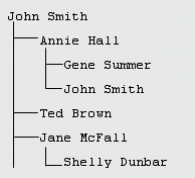
IPRO Analytics can assist reviewers in locating the final email, thus allowing them to review only one document in an email conversation. For more information on email threading, watch the Email Threading video.
For more information about configuring email threading, see Configure Email Threading in IPRO Analytics. For information about working with email threading results and batches, see:
- Set Up the Relationship Panel to Display Email Threads (Analytics)
- Create Full Email Thread Batches for Review (IPRO Analytics)
- Create Inclusive Email Thread Batches for Review (IPRO Analytics)
- Create Email Thread with Near Duplicate Batches for Review (Analytics)
Near-duplicate detection
This IPRO Analytics function identifies textual near-duplicate groups in item text. Textual near-duplicates are items in which most of the text appears in other items in the group and in the same order.
The metadata of the items identified as part of a near-duplicate group will be updated with a group ID to identify the near-duplicate group to which the items belong. For more information on near duplicate detection, watch the Near Duplicate Detection video.
For more information on configuring near duplicate detection, see Configure Near-Duplicate Detection in IPRO Analytics. For information about working with near duplicate detection results and batches, see: